New Car Stereo: Pioneer DEH-P6700MP – Part 2
My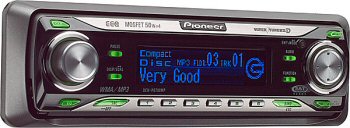 original post on the subject of my Pioneer DEH-P6700MP car stereo has received so many comments that I created this second post, just so people don’t have to scroll down so terribly far to read all of the terrific comments.
I have closed comments on the original post. Please leave a comment here to continue the thread.
Yours in music,
Lee
Hi Lee,
link to page 41 of owners manual didn’t work. how do you set time on the DEH-P6700MP? Good ole daylight savings time you know. Maybe if we did this more than twice a year we might remember the procedure. thanks.
Messed around long enough to figure it out. With radio turned off…hold key and then press while holding the former…the rest is pretty self-explanitory. that is where you find the dimmer too.
The link to the owners manual works. It’s a PDF file.
Glad you figured it out.
anyone know how to trun on the aux settings so the ibus can read the ipod has when i press source the only thing i can see is cd or turner and not multi cd so that my aux can work….please help model deh-p6700mp
can somebody please help me! (before i start, to the last guy) turn your power off and hold audio, my unit is very similar to this one maybe 1 model behind it and that’s how i do it, you have to turn on the option.. now on to my problem, when i do that, my menu doesn’t pop up, as of this morning.. the audio button works in every other way, but when it’s off it won’t.. anybody??
Hi I’ve had my pioneer super tuner IIId (DEHP6700MP)for about three years now. But just yesterday my stereo won’t let me change from cd to radio. It also won’t let me skip any tracks or turn my stereo on or off. Basically the only thing it will let me do is change the volume. Does anyone know what could be wrong? Please help!!
I would like to know how if possible to change the backround color around the face buttons and volume dile from the standard green to amber in order to match the rest of my gauges. Could not find in manual.
JK
please help me to set my radio’s clock
I recently bought an iPod connector, that allows me to plug my ipod into the satellite radio port on the back of the cd player. I know its getting power because it charges my ipod, but I cant figure out how to get the head unit to play the music from the ipod. does anyone know how to switch the head unit to the satellite radio? Source only lets me go to cd player and tuner.
hello anyone know how to trun on the aux settings so the ibus can read the ipod has when i press source the only thing i can see is cd or turner and not multi cd so that my aux can work….please help model deh-p6700mp
Thank god I finally figured out how to fix my Pioneer stereo. It has been doing that flashing thing (screen inverting from black on white to white on black every 7 seconds) and now I hope I can finally fix it. I have been living with it for months now. I wonder how many get returned because people think it is defective. What a stupid “feature” to have. Why would they even do it? I don’t have this same model exactly but do have a Pioneer stereo and I hope turning it off and holding the memory five button for 5 seconds works.
You need the remote to turn on the aux mode. When off, press the F key till you get to AUX OFF/ON setting… It is pretty easy.
Does any body know how to change the dim to yellow? please let me know
I’ve had my unit for about 2 years.After 6 months I went on a road trip and in the middle of playing it died.I’ve checked all wires and connections.I know it is getting power because the 5 and 6 buttons beep as well as the eject button.Also the green light where the cd is inserted illuminates and when the ignition is turned off it beeps.I’ve also checked all fuses and can not fgure out the problem.Anyone know whats wrong?
HELP! I spilled some water in my stereo and now it reads “Protect”.
Is my new stereo ruined or is there a RESET button I need to push.
hey i have been reading about how to get your ipod playing with the aux input, i have it all wired up, and it is in aux mode, but i still cant hear music thru my speakers, yes i have the volume up and the ipod says its playing the song, any help?
i can hear the music playing, but only when i put the volume on the headunit up to max, i can hear it faintly
I have the same problem as steve…. the volume on both the ipod and the unit are completely maxed out and i can just barely hear it.
HELP!!! I just finished installing my DEH-P6700mp in a new car (i’ve had the stereo for 5 years), and it was working perfectly fine but after i finished installing and i went in the Function menu to change the clock and the dimmer settings, something very very strange:
every time i push one of the arrow keys, upon releasing it, it pushes another one… here’s what i mean: let’s say i’m in the clock menu, and i’m pushing UP on the hours… every time i push up, it’ll increase the hours by 1, but it’ll jump to the minutes…
i know this is complicated, i greatly appreciate any help! thanks!
hi there. i was wondering if you would help me with my stereo.. i just installed a new ingnition in my car.. and i turned my car on to AC and now my stereo doesn’t work.. theres no blown fuses.. and its getting power to it. any ideas?
You have to turn on the AUX setting…
Turn the power off
Press and hold the function key
Scroll right until you see AUX
and
Press up or down to turn it on or off.
Turn it back on and use the source button to select it.
I recently had a new battery put in my car and while attempting to fix the clock, I pushed so many buttons that any button I push now says Mute, I cannot play the radio or a CD, I have printed your manual and I cannot find anything about this, any help ???? Please !!!!
My stereo is only playing the cd. It will not turn off or switch to radio. The only time it turns off is when we turn our car off. What happened is my husband was fixing the base and balance and since then it will not do anything but play CDs. Any adivce?
Which CD?
I just got a deh-p6700mp at a pawn shop and installed it in my car, but it has no sound at all. It says MUTE on the screen, how can i turn this off? (I don’t have a remote) Can I reset it or something?
tHE FACE PLATE IS LOST/STOLEN, I NEED A WORKING FACE PLTAE; WHERE CAN I GET IT?
THNKX, saz
THANK YOU LEE FOR THE HELP.
still trying to find the answer to the head unit change color part.. anyone know?
How do i change the color settings to make them different colors?????
i have noticed that quite a few ppl have asked this same question, and it has never been answered. any tips are really helpful! i cant find it in the manual
Thank you, thank you, thank you. I had the magic flashing display and it just about drove me to drink. Nothing in the manual either! You were the only fix I could find!
Thanks very much,
Frank
I dont suppose I can connect my i-pod and my satalite to this stero, can I?
Thanks,
Erik
Erik, I saw somewhere (maybe the manual?) that there is a cable you can connect to the back of the radio that allows such things. The cable is like $50 on eBay though I don’t recall the exact model #. And installation takes a little stereo disassembly. If you find it and install it, tell us about it!
I found the iPod cable, though I haven’t bought one yet. It’s the “Pioneer CD-IB100II iPod Interface Adapter” available on Amazon and other places.
I used to own a Pioneer SuperTuner III a long time ago. It was one of the most difficult stereos to learn to use. It had many features, but you really had to read the manual to learn how to use them. I here it is pretty much the same today. However, they have come a long way with their speakers. I bought a pair of Pioneer 6×9’s recently and I am very impressed with the sound.
When you turn the car on the stereo goes right into the demo mode. The CD player works and the volume but nothing else. Tried disconnecting the battery but nothing seems to work. Tried holding down the “6” button and the “5” button. Any HELP would be greatly appreciated.
just bought a car with a pioneer super tuner 111D WHERE OR HOW CAN WE GET A MANUAL TO SET THE CLOCK AND STATIONS PLEASE
My stereo (DEH-P6700MP) is only playing cds. It will not turn off or switch to radio. The only buttons that work are the volume button and the cd eject button. Is there a reset button somewhere on this unit that I don’t see?
My husband just put this radio in his car and we can get the mute off. We tried looking through the manual but can’t seem to find it. There was something in there about pushing function repeatedly until telephone?? came up but that was no help.
My DEH-P6700MP unit just stopped working. Only the CD player works and the volume knob. None of the buttons work.
thanks for this!
i just had service done on my car, which reset the stereo, and ended up with the inverted flashing display.
i wanted to poke my eyes out, and the owners manual is no help unless you know what demo mode consists of.
Ok I am having the same problem where it appears the faceplate has lost all function except the volume. I can put CD’s in, but I have to listen to each track sequentially.
My theory is the theft prevention system has somehow lost sync with the faceplate, but that doesn’t help me since I have been the original owner and I’ve had it 5 years or so now. Please post if there is a solution.
I might have a solution for loss of functions. I recently noticed that the controls were becoming unreliable. If I pushed the faceplate around, it would sometimes work better.
I sprayed contact cleaner on the metal parts that connect the faceplate and the base, the problem went away immediately :-). You can get contact cleaner at places like Radio Shack. Or a little rubbing with a Q-Tip and with rubbing alcohol will probably do as well. Good luck!
I’ve done everything including clean the contacts. I actually took the thing apart hoping to find a reset button. I was a little scared when I couldn’t get the ribbon connecting the cd reader to the motherboard back together then I realized I needed to ‘open’ the section where the ribbon goes. I could not find any reset button even on the board section. All back together and still the same function except since I took out the power its stuck on demo mode. I think today I will try to get another one. I don’t want to lose my investment in the iPod dock attachment.
i have the same problem as heather. just installed the pioneer supertuner 3 d and i cant get any sound. displays mute or ATT when i go through fuctions, but still not working. how do i get sound?
Hey Thanks ” Turn it off ” hit Memory 5 NO More Flash ” It was driving me nuts !!! Thanks again Dave
Came across this site after googling for a manual because I can’t figure out how to set the clock. I’ve had the radio for a couple weeks and that color inverting has been driving me nuts, thought it was defective, Thank You!
@Cindy Thanks – Did the same and it works!
DEH-P6700MP the radio wont pick up any station
Need a detachable face plate, any idea where to find it? Thanks, Joe from SF, CA
ebay seen a few
Hi I’ve had my pioneer super tuner IIId (DEHP6700MP)for about three years now. But just yesterday my stereo won’t let me change from cd to radio. It also won’t let me skip any tracks or turn my stereo on or off. Basically the only thing it will let me do is change the volume. Does anyone know what could be wrong? Please help!!
search this page for “contact cleaner”.
my deh-p3300 cd player is stuck on mute. can u tell how to fix without pulling player out of dash.
I recently installeda pioneer deh p33 and worked fine at first but now everytime I start car it beeps 3 sets of four times. Ocassionally after playing for a while, it will do the same thing again. Does anyone know what it means and how to fix it?
I have the same issue that a few others have reported – all faceplate buttons are no longer working with exception to the Volume dial. It’s not the contacts – my display is fine – it’s only the input buttons that just stopped working mid-drive. I’m going to pull one of the battery cables to try to reset it, but unless it’s some kind of security lock / theft prevention setting that engaged as someone else mentioned I suspect the faceplate itself is partially cooked.
I wanted to post an update – it was the faceplate itself that went. I tried a different faceplate and that fixed it. Interestingly enough, all my presets are still the same with the new faceplate, which means that the faceplate is purely just an interface. All the “storage” for the faceplate functions reside on the radio itself. This also means that the DEH-P6700MP faceplate is very susceptible to this type of failure, as there are a lot of folks who appear to have had this same problem.
I still can’t hear my auxiliary unless my volume is cranked is their another setting thanks
Witam
Sorry my last post was in wrong language :))
This is some fabric problem because a lot of this model (pionier dep-p6700MP / depp6700MP ). It often bloc front panel so only you can do is to regulate velum of sound and sometimes even this you can’t do.
This solution works you must press two button in the same time SRC+DISP in the left bottom corner.
So first press one and than press second button
It may take few time some time but it work : )
Let know if it help
I tray to put some photo i make
http://www.aywebsite.com/car/radio.html
zbyszek
izizibi, thanks for that comment. Yes, I thought your previous comment was spam because I did not understand the language. Thanks!
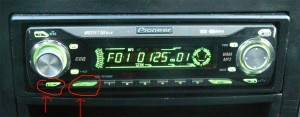
Here is the image Izizibi is pointing to: