All We Are Saying Is Give Sea Kittens a Chance

from our wing nut friends at PETA
The coldest winter I ever spent
Archive for the ‘Distractions’ Category.
from our wing nut friends at PETA
This has been sitting in a dark corner of my computer for years. I just came across it again and…. well, it’s completely immature but I love it. Without further adieu: The Top 10 sexy lines from Star Wars
—————————–
10) “Get in there you big furry oaf, I don’t care what you smell!”
9) “Luke, at that speed do you think you’ll be able to pull out in
time?”
8) “Put that thing away before you get us all killed.”
7) “You’ve got something jammed in here real good.”
6) “Aren’t you a little short for a stormtrooper?”
5) “You came in that thing? You’re braver than I thought.”
4) “Sorry about the mess…”
3) “Look at the size of that thing!”
2) “Curse my metal body, I wasn’t fast enough!”
1) “She may not look like much, but she’s got it where it counts, kid.”
TOP 10 SEXY LINES FROM THE EMPIRE STRIKES BACK
———————————————-
10) “I thought that hairy beast would be the end of me.”
9) “Size matters not. Judge me by my size, do you?”
8) “There’s an awful lot of moisture in here.”
7) “But now we must eat. Come, good food, come…”
6) “That’s okay, I’d like to keep it on manual control for a while.”
5) Hurry up, golden-rod…”
4) “I must’ve hit it pretty close to the mark to get her all riled up
like that, huh kid?”
3) “Possible he came in through the south entrance.”
2) “And I thought they smelled bad on the outside!”
1) “Control, control! You must learn control!”
TOP 10 SEXY LINES FROM RETURN OF THE JEDI
—————————————–
10) “Hey, point that thing someplace else.”
9) “I look forward to completing your training. In time you will call
me master.”
8) “You’re a jittery little thing, aren’t you?”
7) “I never knew I had it in me.”
6) “Someone must’ve told them about my little maneuver at the battle of
Taanab.”
5) “There is good in him, I’ve felt it.”
4) “I assure you, Lord Vader, my men are working as fast as they can.”
“Perhaps I can find new ways to motivate them.”
3) “Grab me, Chewie. I’m slipping – hold on. Grab it, almost… you
almost got it. Gently now, all right, easy, easy, hold me, Chewie.
Chewie!”
2) “Hey, Luke, thanks for coming after me – now I owe you one.”
1) “Back door, huh? Good idea!”
Are you tired of those sissy ‘friendship’ poems that always sound good, but never actually come close to reality? Well, here is a series of promises that actually speak of true friendship. You will see no cute little smiley faces on this, just the stone cold truth of our great friendship.
Friendship is like peeing your pants, everyone can see it, but only you can feel the true warmth.
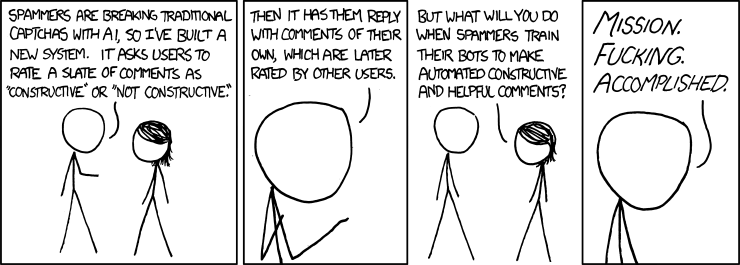
(mouseover: And what about all the people who won’t be able to join the community because they’re terrible at making helpful and constructive co– … oh. )
I get my news from The Daily Show and my blogging advice from XKCD.
Unconstructive comments will be marked as spam.
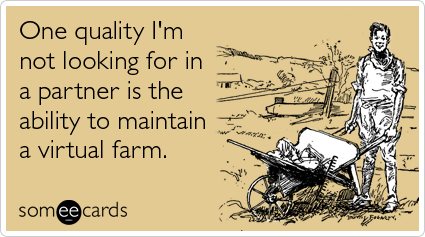
Someecards knows exactly what I don’t want.
Advice for life as seen in the breakfast room of the West Western hotel in Dallas Oregon. This sign hangs over a crock pot full of breakfast gravy. Brent and I, while travelling for earthmine, noticed that this sign had a secret special significance.
 Gravy is not
replenished
once depleted.
It is served as a
first come first
served basis.
Caution: Gravy
is hot!
This is somewhat obligatory.
local version:
Ok, I know I haven’t posted anything of my own creation on the blog in a while… but this makes me so happy!
Every year Burning Man puts out a guide for buying supplies and such. This year’s list is pretty darn huge. So I’ve split it into 2 parts. Here you go!
Part 1
RESOURCES 2010
**\<>/**\<>/**\<>/**\<>/**\<>/**\<>/**\<>/**\<>/**\<>/**\<>/**
Table of Contents
Playa Preparation Events
Lights and Electronics
Miscellaneous BRC Gear
Playa Wear
Services
**\<>/**\<>/**\<>/**\<>/**\<>/**\<>/**\<>/**\<>/**\<>/**\<>/**
Playa Preparation Events
**\<>/**\<>/**\<>/**\<>/**\<>/**\<>/**\<>/**\<>/**\<>/**\<>/**
Prepare for the Playa
Continue reading ‘Burning Man 2010 Resource Guide – Part 1’ »
I went to New York a week ago and saw this poster in Baggage Claim at JFK.
Umm, if the bag made it this far, what do you think the odds are of it being a bomb?
